
How to Delete a TikTok Account: Step-by-Step Guide
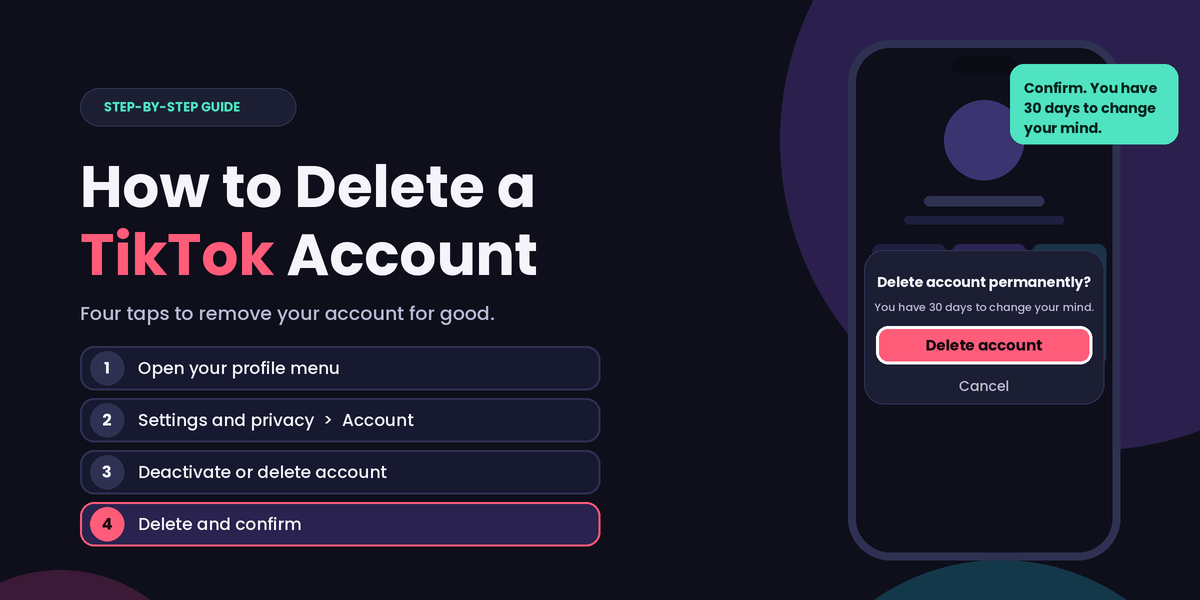
If you no longer enjoy TikTok, want more privacy, or simply need a break from social media, you can delete your account from the app. Before you start, it helps to know that deleting is not instant. TikTok does not erase your account immediately, and you have 30 days to change your mind.
How to Delete Your TikTok Account on Android and iPhone
The steps are almost identical on both devices.
- Open TikTok and go to your Profile: Tap the Profile icon at the bottom of the screen.
- Open the Menu: Tap the three lines in the top right corner, then select Settings and privacy.
- Tap Account: This section holds your account management options.
- Select Deactivate or delete account: You'll find it in the Account menu.
- Choose Delete account permanently: TikTok will ask whether you want to deactivate or delete. Pick the delete option.
- Verify your identity: TikTok may send you a confirmation code that you need to enter.
- Confirm your choice: Tap Delete account on the final screen. You can skip the optional question about why you're leaving.
Your account is now scheduled for deletion.
Deactivate or Delete: Which Should You Choose?
TikTok offers both options on the same screen, and they work differently.
- Deactivate: Your profile is hidden, and your content and data are kept so you can come back whenever you like.
- Delete: Your account is permanently removed after 30 days, and all your data is erased.
If you might return someday, deactivating is the safer choice. If you want the account gone for good, choose delete.
What to Do Before You Delete Your Account
Once the 30 days pass, you can't get your videos or messages back, so take a few minutes to prepare:
- Download your data: Go to Settings and privacy, tap Account, then Download your data, and request a copy of your videos and information.
- Save your favorite videos to your phone's gallery.
- Check linked accounts: If you use TikTok to log in to other apps or websites, switch those to another login method first.
- Spend any coins or balance you have left, since they will be lost with the account.
Can You Recover a Deleted TikTok Account?
Yes, but only within the grace period. If you log in with your original credentials during the first 30 days and confirm you want to restore the account, it comes back. After that, the account and its data are permanently removed.
So don't log in during those 30 days unless you've changed your mind. Logging back in can cancel the deletion.
How to Delete Your TikTok Account From a Computer
You can also start from a web browser. Log in at tiktok.com, open your settings, and look for Manage account, then Deactivate or delete account. TikTok sometimes asks you to finish in the mobile app, so keep your phone nearby.